

Embedding a Youform on Your Website
Updated 3 months ago
Youform makes it easy to embed beautiful, mobile-friendly forms on your website — either with JS embed (recommended) or iframe embed (basic).
Apart from embed there are other options like popup embed and full page embed as well. Just follow this guide for inline embed and then you can find the other 2 kinds of embed code in the same form→ share tab.
Remember we have an option to "configure" your embed code (which looks like the screenshot below) and in most cases you won't need this doc. But if you still feel that's not sufficient then read ahead.
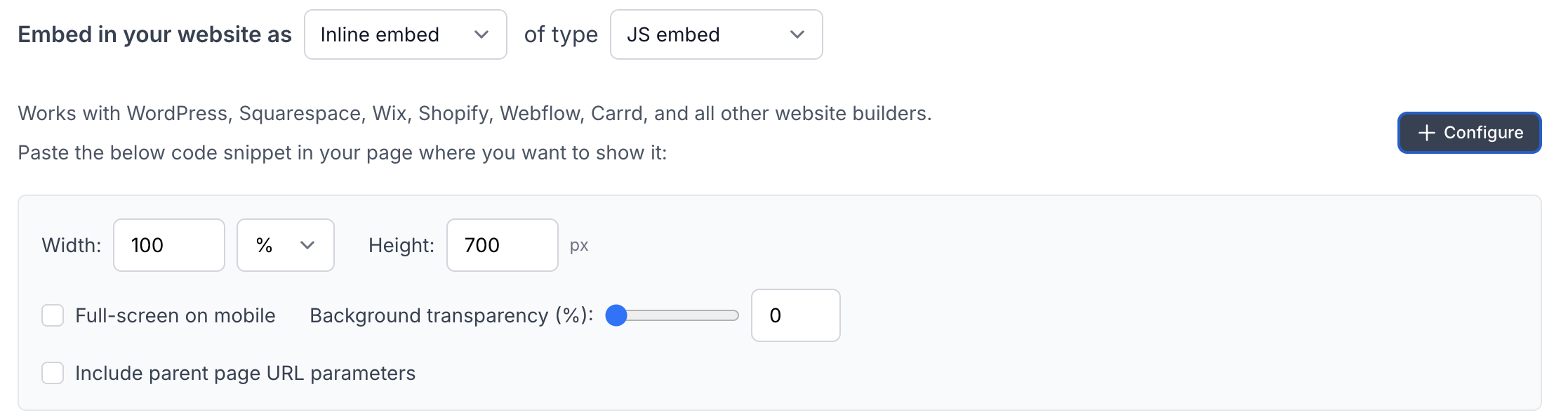
You can configure width, height, and whether to use the parent page URL parameter from the UI itself.
In the JS embed code, you can configure several options:
Width and height settings
Option to enable full screen on mobile devices
Adjust background transparency.
Option to include parent page parameters to the form
Recommended: JavaScript (JS) Embed
This is the default method selected when you choose:
Share → Inline Embed → JS Embed

Quick Start
Go to your form → Share tab → Get the inline embed code.
<div data-youform-embed data-form="your_form_id"></div>
<script src="https://app.youform.com/embed.js" async></script>
Just get the code from that page (which will look like the above).

Advanced Options
You can control how the embed behaves using data- attributes. Full example is added below.
1. Size
data-width="100%"    <!-- default: 100% -->
data-height="600"    <!-- default: 700 -->
2. Static Parameters – data-params
Use this to send fixed query parameters:
data-params="ref=homepage&campaign=summer" 3. Parent Page URL Parameters – data-parent-params
Use this to pass parameters from the parent page URL (like UTM tags).
If you add data-parent-params then all the parent page URL parameters will be passed to your embedded form. You can cherry pick as well by passing which parameter to pass. You can skip adding data-parent-params to not pass any of the parent URL parameters.
A handy table for the same:
Value | Behavior |
|---|---|
| Pass all query params from parent page |
| Pass only selected keys |
Not included at all | No parent URL params passed |
data-parent-params="utm_source,ref"Full Example
<div
  data-youform-embed
  data-form="abc123" // Youform form id
  data-width="60%" // Your desired width
  data-height="650" // desired height
  data-params="source=landing" //the params you want to pass to form
  data-parent-params="utm_source,ref" //the params you want to pass from parent page URL to the form
></div>

<script src="https://app.youform.com/embed.js" async></script>
Bonus: Works with Multiple Forms
Just add multiple <div data-youform-embed> blocks on the same page to add more than one Youforms.

Redirects on Submit
If your Youform is configured to redirect after submission, this will automatically work with JS embeds.
No extra code is needed — we handle it for you.
For Developers: Manual Trigger (Optional)
If your site uses React, Vue, or dynamic content loading, you can manually trigger the embed:
window.YouformEmbed.init();This re-initializes the embed script in case forms were added dynamically after page load.

Also Available: Iframe Embed (Basic)
From the Share tab, you can also choose:
Share → Inline Embed → Iframe Embed
This gives you a simple embed code like this:
<iframe
  src="https://app.youform.com/forms/abc123"
  width="100%"
  height="700"
  frameborder="0"
  loading="lazy"
></iframe>
This method works, but has limitations.

Limitations of Iframe Embed
Feature | JS Embed ✅ | Iframe Embed ⚠️ |
|---|---|---|
Pass parent page URL params | Yes |  No |
Redirect after submission | Yes | No |
Multiple forms per page | Yes | Yes |
React / dynamic content support | Yes (with | No |

When to Use Iframe Embed?
When you can’t use JavaScript on your page (for e.g GoDaddy websites)
When you're adding forms inside platforms that only allow iframe HTML (e.g. some CMS platforms or email tools)
Otherwise, we recommend always using the JS Embed for better flexibility and features.